

A practitioner’s guide to agents that drive software the way people do, with a benchmark of what actually works in September 2026.
Two years ago, “computer use” was a demo. A model took a screenshot, clicked something, and everyone applauded because it worked once. In 2026 it is a line item in production budgets, a row in a risk register, and a genuinely hard engineering problem that most teams underestimate on the first attempt.
The interesting thing is not that agents can click. It is what happens to your architecture when they can. Every integration decision you have made for twenty years assumed the interface between two systems was an API. Computer use says the interface can be the screen. That is either liberating or terrifying depending on which system you are looking at.
This piece covers why the category exists, what it actually contains once you look past the marketing, and how the loop works at the level of code. Then a benchmark across commercial and open models, with the caveats that make the numbers usable. All numbers are current as of early September 2026 and will be stale by December. That is the pace of this field.
Start with the honest version, because most articles skip it.
If the system you want to automate has an API, use the API. A screen-driving agent is the expensive, brittle, hard-to-audit way to do something an authenticated HTTP call does in 40 milliseconds for a fraction of a cent. An API call returns a status code. A click returns a screenshot that looks right.
So why does anyone build this? Because a large amount of real work sits on surfaces that have no API and never will:
That last one is the real driver in regulated environments, and nobody puts it on a slide.
There is a second argument, subtler and more durable. A screen-driving agent generalises across applications without integration work per application. Traditional RPA also drives screens, but it drives them by recorded selectors and coordinates, so it breaks when the UI moves. A model that reads the screen can adapt to a moved button. That difference is why the category is worth a look even where RPA already exists.
Now the finding that should reframe the whole discussion. Alibaba’s Qwen-UI-Agent technical report includes something most labs do not publish: the distribution of its own actions. Its action space includes a cli_command action alongside click, type and drag, so the model gets a free choice between clicking a button and typing a command. On OSWorld-Verified, typed commands were 40.7% of all actions and appeared in 92.0% of tasks. On the harder OSWorld-v2 set, that rose to 55.1% of actions across 98.2% of tasks.
Read that again. The strongest published screen-driving agent of 2026, given the choice, avoids the screen more than half the time on hard tasks.
ByteDance’s ablation says the same thing from the other side: UI-TARS-2 scores 29.6% on BrowseComp with its full toolkit and 7.0% when restricted to GUI-only operation. Roughly three quarters of that capability came from terminal and tool access rather than from pixels.
The practical takeaway for anyone scoping a project: computer use is the fallback layer, not the primary one. Give the agent a terminal, an API client, and a file editor alongside the mouse, and let it choose. Design as if pixels are the last resort, because the best models already behave that way.
The term covers four different products wearing one name. They have different reliability, different costs, and different failure modes, and conflating them is how projects get mis-scoped.
Layer 1: browser agents. The task lives inside a web page. The agent gets a screenshot, often plus the DOM, and drives a headless or headful Chromium through Playwright or CDP. Browser Use and Skyvern live here, as does Anthropic’s browser_toolset_20260801 and most of what OpenAI and Google publish benchmarks for. Highest reliability of the four, because the DOM gives you real element handles instead of pixel guesses, and because the environment is cheap to reset.
Layer 2: desktop GUI agents. Pixels in, mouse and keyboard out, against a whole operating system. This is computer use in the strict sense: Anthropic’s computer_toolset_20260801, OpenAI’s computer tool, Gemini’s desktop environment, Holo and UI-TARS on the open side. Hardest layer, because there is no DOM, no stable identifier for anything, and the agent has to infer state from a picture.
Layer 3: terminal and CLI agents. No GUI at all. The agent runs commands and reads output. Claude Code, Codex and the rest of the agentic CLI family. People forget this is part of the same family, but Terminal-Bench measures the same underlying skill: acting in an environment, observing the result, recovering from errors. It is also, per the Qwen finding above, where a good agent spends most of its actions when allowed.
Layer 4: OS-level assistants. The vendor owns the loop and the sandbox. Windows Copilot Actions runs each agent in an Agent Workspace implemented as a Remote Desktop child session rather than a VM, isolated from the user’s own desktop, and ships turned off by default. Claude Cowork, Claude in Chrome and Claude for Microsoft 365 sit here too, as does Apple’s on-device work. You trade control for a supported security model, which in an enterprise is often the right trade.
| Layer | What it drives | Identifiers | Reliability | Where it fits |
|---|---|---|---|---|
| Browser agent | Web pages | DOM plus pixels | Highest | SaaS portals, forms, scraping behind login |
| Desktop GUI agent | Whole OS | Pixels only | Lowest | Legacy desktop apps, cross-application work |
| Terminal agent | Shell | Text | High | Anything a command can reach |
| OS assistant | Vendor sandbox | Vendor-defined | Varies | Knowledge work, per-user productivity |
One warning about layer 2. There is a failure mode that pixel-driven agents cannot see and that took teams a long time to find in production: a React controlled component can render the correct value after a click while the framework’s internal state never updates. The screen says done. The submitted payload says null. Visual verification passes because the screen genuinely looks correct. If you are automating forms that matter, verify the outcome in the backing system, not on the screen.
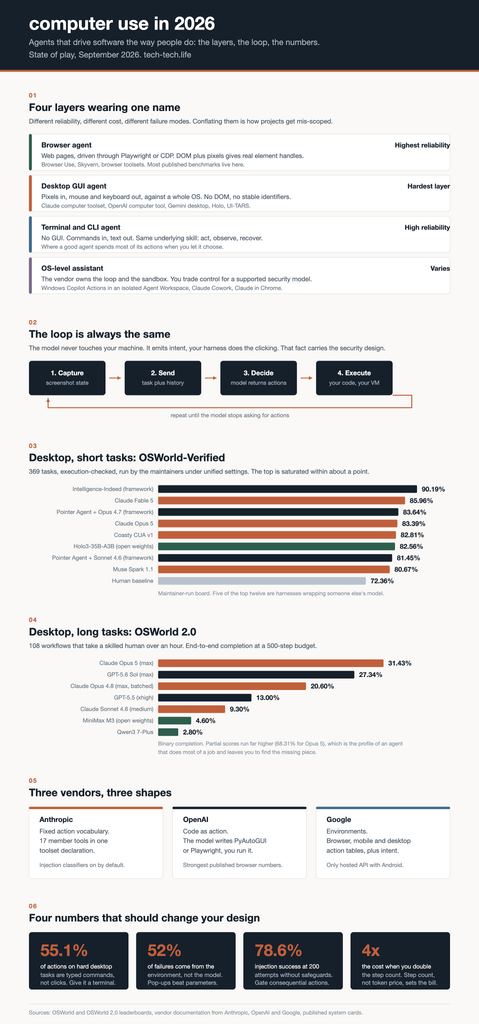
Every computer use system, closed or open, is the same loop:
The model never touches your machine. It emits intent; your harness does the clicking. That single fact carries most of the security design, and it is also why the vendors can offer this without hosting a VM for you.
The frontier labs have quietly diverged here, and it is the most interesting architectural split in the category.
Anthropic gives you a fixed action vocabulary. One entry in the tools array, computer_toolset_20260801, exposes 17 member tools: screenshot, left_click, type, key, scroll, zoom, left_click_drag, hold_key, wait and the rest. No beta header is needed. Claude replies with tool_use blocks that carry "toolset_name": "computer", often several in one turn as a batch action that you run in order:
import anthropic

client = anthropic.Anthropic()

response = client.messages.create(
    model="claude-opus-5",
    max_tokens=1024,
    tools=[
        {"type": "computer_toolset_20260801"},
        {"type": "text_editor_20250728", "name": "str_replace_based_edit_tool"},
        {"type": "bash_20250124", "name": "bash"},
    ],
    messages=[{"role": "user", "content": "Save a picture of a cat to my desktop."}],
)
Note the second and third tools. Declaring bash and the file editor alongside the mouse is the single highest-leverage thing you can do, because it lets the model drop out of the GUI when a command would be faster. That is the Qwen finding turned into configuration.
OpenAI now recommends the opposite shape. For GPT-6 Astra, the documented recommendation is code execution: you expose one function tool that accepts a script, the model writes PyAutoGUI or Playwright code, and your sandbox runs it. A single call can contain loops and conditionals instead of one click. The structured computer tool remains supported as an alternative, with nine action types batched into an actions[] array.
tools = [{
    "type": "function",
    "name": "exec_py",
    "description": (
        "Run Python in a persistent desktop. Variables persist across calls. "
        "Available: pyautogui, time, log(value), and display(PIL_image). "
        "Inspect the screen with display(pyautogui.screenshot()) before acting."
    ),
    "parameters": {
        "type": "object",
        "properties": {"code": {"type": "string"}},
        "required": ["code"],
        "additionalProperties": False,
    },
    "strict": True,
}]
Google sits in the middle and adds the one thing neither competitor has: environments. The computer_use tool attaches to general Flash models rather than a dedicated model, and it exposes three action tables, for browser, mobile and desktop, with mobile adding open_app, list_apps and long_press. Each action comes back with an intent field explaining the model’s reasoning for that step, which is unexpectedly useful for audit logs. Coordinates come back normalised rather than in raw pixels.
If mobile is in scope, Gemini is currently the only hosted API with a documented Android environment. Neither Anthropic nor OpenAI has a tap or a swipe anywhere in its vocabulary.
Ninety percent of “the agent is stupid” reports are coordinate bugs. The model returns coordinates in the pixel space of the image you sent. If you send a native 4K screenshot and the API silently downscales it, the model is clicking on a degraded image while your harness applies those coordinates to the full-size display. Every click is offset in the same direction, and the transcript looks like the model has lost its mind.
Anthropic’s guidance, backed by their own testing, is blunt: pre-downscale before sending, and treat this as worth more than almost any other optimisation. The limits differ by model generation. Opus 4.7 and later accept up to 2576 pixels on the long edge and roughly 3.75 megapixels. Earlier models cap at 1568 pixels and about 1.15 megapixels. Newer toolset versions reject oversized images rather than downscaling them for you, which is arguably a favour.
import math

MAX_LONG_EDGE = 2576      # 1568 on the 4.6 family
MAX_PIXELS = 3_750_000    # 1_150_000 on the 4.6 family

def compute_max_api_fit(native_w, native_h):
    aspect = native_w / native_h
    h_from_pixels = math.sqrt(MAX_PIXELS / aspect)
    w_from_pixels = h_from_pixels * aspect
    if native_w >= native_h:
        w = min(w_from_pixels, MAX_LONG_EDGE); h = w / aspect
    else:
        h = min(h_from_pixels, MAX_LONG_EDGE); w = h * aspect
    return int(min(w, native_w)), int(min(h, native_h))

def to_screen(api_x, api_y, display_w, display_h, screen_w, screen_h):
    return int(api_x * screen_w / display_w), int(api_y * screen_h / display_h)
Three more findings from the same guidance that cost nothing to apply. Start at 1280×720 and only go higher if the model has a reason to. Put the text instruction before the image in your content array, because telling the model what it is looking for before it processes the screenshot measurably improves click accuracy. And on macOS, remember the device pixel ratio of 2, which is a classic source of everything being off by exactly half.
Things that did not help, per the same testing: splitting screenshots into tiles, overlaying a coordinate grid, and switching resize algorithms. Skip those experiments, someone already ran them.
UI work is perceptual, not logical. More reasoning per action does not buy what it buys on a maths problem.
On the Claude 4.6 family, medium effort is the sweet spot, and with retries it converges to the same success rate as high at half the token cost. The counterintuitive part: low effort uses fewer total output tokens than disabling thinking entirely, because the model makes fewer mistakes and needs fewer retries. On Opus 4.7 the recommendation shifts to high by default, with low still landing between the previous generation’s high and max. Max effort is not recommended for UI work on the 4.6 family at all: more tokens, no accuracy gain.
Each screenshot costs roughly 1,000 to 1,800 input tokens. Add the toolset definition, which is about 4,500 input tokens on every single request before you have sent a pixel, and a long session fills a 200k window in well under a hundred actions. There is also a hard edge at 20 images per request, past which every image in that request is held to a stricter size limit.
Three layers handle this, and they compose:
This is the part that decides your bill. Context management has more impact on long-running agent cost and latency than model choice does.
Batch actions. Let the model emit click, type and screenshot in one turn instead of three round trips. The gain is wall-clock time and output tokens on long tasks. The risk is compounding error: if action one misses, actions two and three operate on a screen that no longer matches the plan. Use batching when the sub-actions are self-contained, such as filling several form fields, and avoid it during exploratory navigation or error recovery. Run the blocks in order, stop at the first failure, and answer the remaining blocks with the halt text so the model can see exactly what was skipped and replan.
Teaching by demonstration. Instead of iterating on prose until the model gets a workflow right, record a human doing it: actions, annotated screenshots, optionally voice narration. Replay that as context. Playback is not strict replay; the model uses the demonstration as a guide and adapts when a button has moved. Anthropic ships this as Teach Mode in Claude in Chrome, and the data model is simple enough to reimplement: action, description, selector, coordinates, screenshot, viewport. Support a strictness setting, because a compliance workflow wants “follow exactly and stop if the UI changed” while a research workflow wants “hit the goal, the steps are hints”.
Orchestrator plus executor. Put a reasoning model on planning and a cheaper, mechanically precise model on the clicking. Anthropic’s advisor tool formalises this inside one request: the executor calls an advisor model mid-generation for a course correction and continues, with no extra round trip on your side. Cap the calls, because each consult bills at the advisor model’s rate.
Four rules, learned the hard way.
A score belongs to a system, not a model. OSWorld-Verified separates general models, specialised models and agentic frameworks for a reason. On the maintainer-run board, the top entry is a harness wrapping somebody else’s model, and five of the top twelve are frameworks rather than models. The scaffolding is worth more points than the weights. If you buy a model expecting the leaderboard number, you will miss it by a wide margin.
Verified is not the same as reported. The OSWorld team runs submissions themselves under unified settings. Vendor charts do not. One vendor in this space publishes both its verified number and its internal number in the same sentence, 82.81% and 85.6%, a 2.8 point self-measured premium honestly stated. Assume a similar gap sits behind every vendor chart, including the ones I quote below.
Benchmark versions do not convert. OSWorld-Verified and OSWorld 2.0 are different protocols with different task sets and different scoring. A number from one tells you nothing about the other.
Human baseline on OSWorld is 72.36%. Everything in the current top twelve is above it. That sounds like the problem is solved. It is not, which the long-horizon numbers below make painfully clear.
369 real desktop and web tasks (361 when eight Google Drive tasks are excluded), execution-checked. Here is the maintainer-run board, which is the version I would quote in a steering committee:
| # | System | Type | Score |
|---|---|---|---|
| 1 | Intelligence-Indeed Agent | Agentic framework | 90.19% |
| 2 | Claude Fable 5 (1m) | General model | 85.96% |
| 3 | Pointer Agent with Opus 4.7 | Agentic framework | 83.64% |
| 4 | Claude Opus 5 (1m) | General model | 83.39% |
| 5 | Coasty CUA v1 | General model | 82.81% |
| 6 | Holo3-35B-A3B | Specialised model, open weights | 82.56% |
| 7 | Pointer Agent with Sonnet 4.6 | Agentic framework | 81.45% |
| 8 | Muse Spark 1.1 | General model | 80.67% |
| Human baseline | 72.36% |
Aggregator tables that mix vendor-reported rows tell a slightly different story, with Qwen3.8 Max leading at 86.1%, Claude Fable 5 and Mythos 5 at 85%, Qwen3.8-27B at 84.3%, Claude Opus 4.8 at 83.4%, Gemini 3.6 Flash at 83.0%, Claude Sonnet 5 at 81.2%, GPT-5.5 at 78.7%, Kimi K2.6 at 73.1% and MiniMax M3 at 70.1%. Treat the ordering as indicative. There is even a naming wrinkle worth knowing: Anthropic self-reports 83.4% for Opus 4.8, while the maintainer sheet carries 83.39% on a row labelled Opus 5, and has no Opus 4.8 row at all. The figure matches, the label does not.
The honest summary: the top of this benchmark is saturated, clustered within about a point, and no longer a useful basis for choosing a vendor.
This is the benchmark that matters now. 108 workflows across 31 self-hosted websites and desktop applications, where 69.6% take a skilled human over an hour, averaging more than 250 agent steps, scored with partial credit across roughly 27 checkpoints per task.
At the 500-step budget:
| System | Effort | Binary completion | Partial score | Est. cost |
|---|---|---|---|---|
| Claude Opus 5 | max | 31.43% | 68.31% | n/a |
| GPT-5.6 Sol | max | 27.34% | 62.72% | n/a |
| Claude Opus 4.8 | max, batched | 20.60% | 54.80% | n/a |
| Claude Opus 4.7 | max | 13.90% | 49.10% | $3.87K |
| GPT-5.5 | xhigh | 13.00% | 49.50% | $2.75K |
| Claude Sonnet 4.6 | medium | 9.30% | 33.90% | $1.55K |
| MiniMax M3 | enabled | 4.60% | 22.30% | $258.78 |
| Kimi K2.6 | enabled | 4.60% | 22.10% | $708 |
| Qwen3 7-Plus | thinking | 2.80% | 21.50% | $411.56 |
The best system in the world finishes fewer than one in three long professional workflows end to end. It makes visible progress on two thirds of the checkpoints, which is exactly the profile of an agent that does most of a job and leaves you to find the missing piece.
Three findings from that leaderboard deserve to be printed and pinned above a desk:
Also note the cost column. A single benchmark run costs thousands of dollars on frontier models and hundreds on open ones. That ratio carries straight into production.
Browser is where OpenAI leads on published numbers: 92.8% on Online-Mind2Web, 67.3% on WebArena-Verified, 90.4% on BrowseComp, all vendor-reported. OpenAI also publishes an unusually concrete customer result, roughly 95% first-attempt success across about 30,000 property-tax portals, reaching 100% within three attempts. That is a better signal than a leaderboard, because portals are exactly the surface this technology is for.
Mobile is a two-horse race and neither horse is American frontier. Qwen-UI-Agent reports 82.1% on MobileWorld against 73.2% for Seed 2.1 Pro, with 92.2% on a held-out set of 409 tasks across 104 live Android apps on more than 100 physical handsets. Holo3.1’s 35B-A3B reports 79.3% on AndroidWorld, up from 67% in the previous generation. Anthropic and OpenAI are simply not in this race.
Terminal is measured separately and it is worth watching, given how much of a good agent’s work happens there. On Terminal-Bench 4.0: GPT-6 Astra under Codex at 58.2%, Fable 5.1 under Claude Code at 57.9%, Opus 5 under Claude Code at 51.8%.
| Claude computer use | OpenAI computer use | Gemini computer use | |
|---|---|---|---|
| Shape | 17-member client toolset | Code execution recommended, computer tool supported | Built-in tool on Flash models |
| Environments | Desktop, browser | Desktop, browser | Browser, mobile, desktop |
| Mobile actions | None | None | 10, including open_app and long_press |
| Injection defence | Classifiers on by default | Published policy, you implement | Detection available, off by default |
| Who supplies the VM | You | You | You |
| Headline desktop score | 83 to 86% OSWorld-Verified | Browser-led numbers | 83.0% (3.6 Flash) |
| Indicative price per MTok | Opus 5 $5 / $25, Sonnet 5 $2 / $10 | Sol $4 / $20, Luna $0.20 / $1.20 | 3.7 Flash $0.75 / $3.75 |
Three notes on that table. Anthropic’s classifiers running by default is the single biggest differentiator for a regulated deployment, and they run in parallel with inference at approximately zero added latency and no added cost. Gemini’s price is the lowest by a distance, but the recommended model’s rate doubles on 1 January 2027, so budget at the post-increase number. OpenAI’s currently advertised rates are promotional through 21 November 2026.
The open side is more credible than it was a year ago, with one structural caveat: every open-weight GUI agent you can download is a Qwen derivative. Leaving Alibaba means changing licence, jurisdiction and post-training team, not architecture.
| Model | Licence | Best verified score | Notes |
|---|---|---|---|
| Holo3-35B-A3B (H Company) | Apache 2.0 | 82.56% OSWorld-Verified, maintainer-run | Only specialised open model in the top six |
| Holo3.1 family | Apache 2.0 | 79.3% AndroidWorld (35B-A3B) | 0.8B to 35B, plus FP8, NVFP4 and Q4 GGUF for local runs |
| UI-TARS-1.5-7B (ByteDance) | Apache 2.0 | 27.5% OSWorld, 49.6% ScreenSpot-Pro | Deepest ecosystem, but the model line has not moved since 2025 |
| MAI-UI-8B / 2B (Alibaba) | Apache 2.0 | 65.7% / 57.4% ScreenSpot-Pro | Strong grounding, weak end-to-end |
Holo is the one I would actually deploy. Its headline number is on somebody else’s board rather than its own, its 82.56% is higher than H Company’s own published claim, quantised builds land within about two points of the full checkpoint, and there is a hosted endpoint at $0.25 in and $1.80 out if you want to start managed and move to self-hosted later. Read the licence per checkpoint though, because it changes between model sizes and the current 122B flagship has no weights at all.
The pattern across the open field is consistent and useful: grounding is close to solved in open weights, and finishing a multi-step workflow is not. MAI-UI is 10 points behind on grounding and 40 points behind on end-to-end mobile work. If your architecture only needs “where is the Submit button in this screenshot”, an open model does that well and cheaply, and Holo even sells that as a dedicated element-localisation mode you can drop inside somebody else’s agent. If it needs “complete this workflow”, the gap is still real.
Ignore the per-million-token price. The number that decides your bill is step count, because every step re-sends the trajectory plus a new screenshot. A 60-step run costs roughly four times a 30-step run, not twice.
Practitioner-reported figures for a browser agent cluster around 20 to 50 model calls per task and $0.50 to $3.00 per task at mid-tier frontier pricing, with a meaningful share of runs drifting off task partway through. Skyvern’s credit maths works out to roughly $0.024 per step. Against a human doing the same portal task in four minutes, that arithmetic works. Against an API call, it never does.
A computer use agent consumes untrusted content by design. Every screenshot is an input channel controlled by whoever wrote the page. An agent that can click and type can be talked into clicking and typing something else.
The numbers are not comfortable. In a 2026 study of 3,168 adversarial runs against two open browser agents, indirect injections hidden in ordinary web content succeeded between 41.67% and 68.16% of the time, and direct injections exceeded 79% across every tested configuration. The OS-BLIND benchmark, which embeds attacks in the environment under entirely benign user instructions, reported 73.0% attack success against Claude Sonnet 4.5. Prompt injection sits at LLM01 in the OWASP list for a reason, and in February 2026 OpenAI shipped Lockdown Mode for ChatGPT while stating publicly that injection in AI browsers may never be fully patched.
Defences do work, and the trend line is genuinely good. Anthropic reports browser-agent attack success falling from 49.36% on Sonnet 4.5 to 1.29% on Sonnet 4.6 for the same best-of-N evaluation. But read the attempt-count breakdown before relaxing: on a GUI agent with extended thinking, one attempt succeeded 17.8% of the time, while 200 attempts reached 78.6% without safeguards and 57.1% with them. An attacker who can retry is a different threat model from an attacker who gets one shot, and a public portal gives attackers unlimited retries.
So the design rules, in order of how much they actually buy you:
For a bank, one more rule. An agent that operates a screen produces no confidence score. A click carries no “I am 60% sure this was the right button”. If your process requires a confidence threshold for routing to a human, you have to build that signal yourself from outcome verification, not from the agent’s own report.
The situation: several thousand client files need a document refresh. The core banking system has an API in theory, and a service account request that will not clear review this year. The document portal is a vendor product with no integration story.
The shape that works: a browser agent, not a desktop one, running against the portal in an isolated container with an allowlist containing exactly two domains. Credentials injected into the browser session by the harness. The agent reads a queue of client references from a CSV, opens each file, checks whether the required document exists and is in date, and writes a result row. It does not upload, approve or reject anything. Every state-changing action goes to a human queue with the screenshot attached.
Why this scopes well: the agent is doing perception and navigation, which is what it is good at, while the decisions and the writes stay with people. The audit trail is the trajectory log plus the screenshot per step, which is closer to what a regulator expects than most RPA logs. And because each file is an independent short task rather than one long session, you are on the part of the capability curve that works, not the long-horizon part that collapses.
Where it goes wrong: pop-ups, session timeouts and paywall-style interstitials. Budget for them, because per the failure taxonomy below they are a bigger cause of failure than model quality.
The situation: a Selenium suite where a third of the failures are selector rot rather than real regressions, and the maintenance cost has quietly exceeded the value of the tests.
The shape that works: keep the deterministic suite for the paths that rarely change, and use an agent for exploratory and smoke coverage where you describe intent rather than selectors. “Log in as a standard user, add any two items to the cart, apply the promo code, and confirm the total updates” survives a redesign. A selector does not.
Two implementation notes. First, give the agent the terminal alongside the browser: it should be able to seed data with a command instead of clicking through a setup wizard. Second, verify in the backing system. Assert against the API or the database, not against the rendered page, because of the commits-that-do-not-commit problem described earlier.
This is also the safest place to start in an organisation. The blast radius is a test environment, the cost per run is predictable, and the team learns the operational patterns before anything touches a customer.
The situation: moving structured data into or between internal systems where one side is a desktop client from a decade ago, or a web app whose export produces a format nobody else reads.
The shape that works: desktop GUI agent, and this is the layer where you should expect the most pain. Use keyboard navigation rather than clicking wherever possible, because dropdowns and small targets are where click accuracy degrades. Keep zoom enabled so the model can inspect dense UI at full resolution. Record a demonstration of one complete case and replay it as context rather than describing the workflow in prose. Set strictness to adaptive so a moved button does not stop the run.
Chunk aggressively. A hundred records is a hundred short tasks with a checkpoint after each, not one long session. The OSWorld 2.0 finding about horizon collapse is the whole argument here: agents lose track of hidden state across long runs, so do not build a long run.
And ask the awkward question first. If the target system has a bulk import that accepts a CSV, the agent should generate the CSV and a human should press import. That is a twenty-minute job with an audit trail, not a three-week automation project.
Alibaba published something useful that most labs do not: a classification of every failed run rather than just a success rate. Across failed trajectories of a baseline model, 52.0% of failures came from the environment, broken down as misreading the interface at 24.7%, interference from pop-ups, ads, paywalls and CAPTCHAs at 18.2%, and trouble with awkward widgets at 9.1%. Only 40.3% came from the model itself: failing to explore at 19.5%, getting stuck in action loops at 14.3%, losing track of state at 6.5%.
Buying a better model addresses the smaller half. A cookie banner is not a model problem. This is why proxy handling, CAPTCHA strategy and environment hygiene are not incidental features of the browser-agent vendors, they are attacks on the majority of the actual failure distribution.
Six rules I would defend in a design review.
Ask whether it has an API, twice. Once at scoping and once after the first prototype disappoints. Computer use is the fallback layer.
Give the agent a terminal. The best models already prefer commands to clicks on hard tasks. Declaring bash and a file editor alongside the mouse is free and changes the capability profile.
Pick the layer, then the vendor. Browser task, browser agent. If the target is a website, a harness that supplies the Chromium and lets you swap models is cheaper and more predictable than a frontier computer use API. Desktop task, Claude or Gemini. Mobile, Gemini or Holo, and nobody else. Terminal, use a coding agent and stop calling it computer use.
Design for short tasks. Chunk, checkpoint, verify, repeat. Every long-horizon number in this article says the same thing.
Instrument before you scale. Trajectory logs, screenshots per step, outcome verification against the backing system. If you cannot replay a failure, you cannot improve the system, and you certainly cannot explain it to an auditor.
Assume the screen is hostile. Confirmation gates on consequential actions, minimum privileges, domain allowlist, credentials out of the prompt. The defence numbers are improving fast, and they are not good enough to skip the architecture.
The category is real and it is useful. It is also two years away from being boring, and boring is what you want in production. Start where a mistake is cheap, measure your own before-and-after rather than a leaderboard, and let the agent choose the terminal when the terminal is faster.

Priya Raghunathan
October 1, 2026It’s interesting to think about how engineering teams will adapt to the changes introduced by GPT-6 Astra. The impact on collaboration processes could be significant. translate documents online