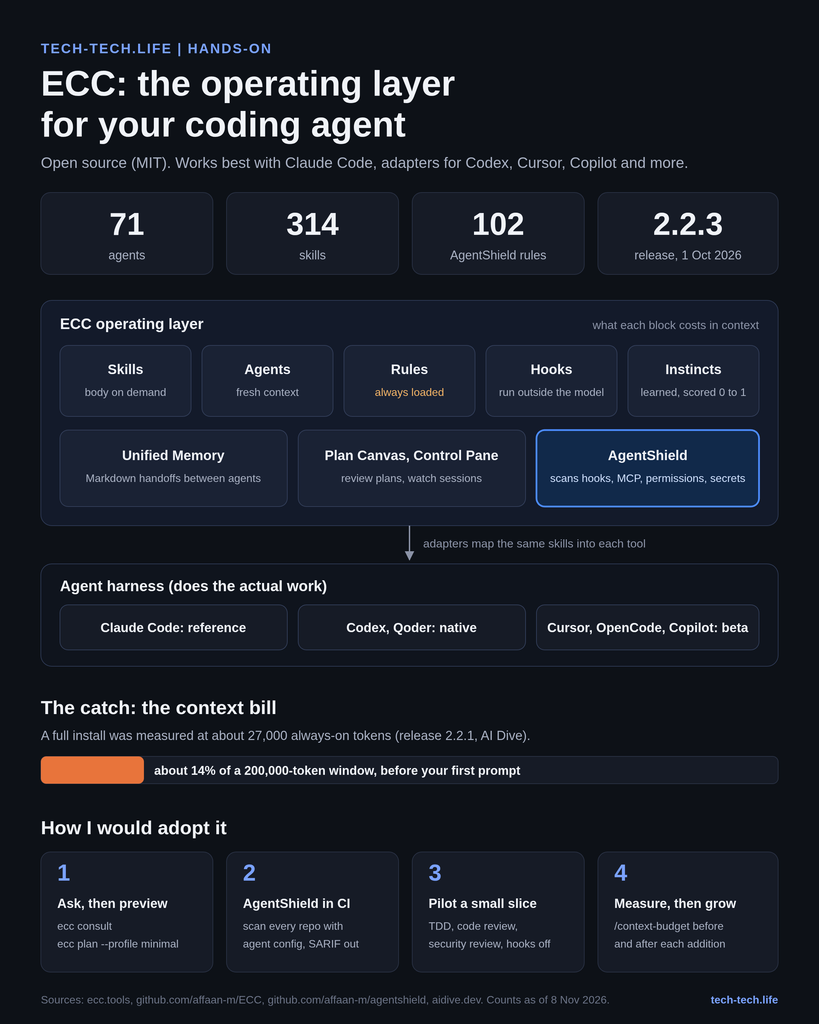

ECC is the most-starred agent configuration project on GitHub (about 299,000 stars in early November 2026), and it is worth your time only if you install a small, deliberate slice of it. This is a hands-on walkthrough: what ECC is, how its parts fit, the exact commands I ran to try it, and where it sits next to Spec Kit, Superpowers and BMAD.
A quick confession first. I have not lived with ECC in a production repository yet. So instead of opinions from the armchair, I installed the npm runtime (ecc-universal 2.2.3 and ecc-agentshield 1.6.0) in a clean Linux sandbox on 8 November 2026 and ran every non-interactive command shown below. Where a step needs Claude Code itself, I say so and point to the official docs.
In July I wrote about AI-driven coding frameworks: the why, the what and the how. ECC is the piece that was missing from that benchmark, and it is a different animal. Spec Kit and BMAD tell your agent what to build. ECC tries to change how your agent works, every day, across every tool you use.
ECC started life as “Everything Claude Code”, a public dump of the Claude Code setup Affaan Mustafa used to win the Anthropic x Forum Ventures hackathon in September 2025. It is MIT-licensed and unaffiliated with Anthropic. In 2026 it outgrew the name: the project now calls itself the operating layer for agent harnesses, and the short name ECC stuck.
Its thesis fits on one line from the README: optimize the context window, persist everything else. The loop it installs is plan, test, implement, review, verify, remember, improve. Instead of repeating “please write tests first” in every prompt, you install that discipline once.
Today ECC is really four things under one brand:
| Piece | What it is | Price |
|---|---|---|
| Open-source toolkit | 71 agents, 314 skills, 98 legacy command shims, hooks, rules, memory, continuous learning (README, release 2.2.3) | Free, MIT |
| AgentShield | Security scanner for agent configs: 102 rules across secrets, permissions, hooks, MCP and agents | Free, MIT |
| ECC CLI runtime (ecc-universal) | Selective installer, doctor/repair, memory vault, Plan Canvas, Control Pane | Free, MIT |
| ECC GitHub App | Mines your repo history into SKILL.md files and runs config audits on PRs | Free on public repos, $19 per active seat per month for private repos, Enterprise on quote |
The numbers move fast. A review from September counted 68 agents and 286 skills; the README in November says 71 and 314. Treat every count in this article, mine included, as a snapshot.
The current release is 2.2.3, published on 1 October 2026. It needs Node.js 18 or newer, plus Git and Claude Code 2.1 or newer for the Claude plugin path.
ECC does not replace your coding agent. Claude Code, Codex or Cursor still reads files, runs tools and holds the conversation. ECC wraps that runtime with five kinds of building blocks, and the trick is that each one pays a different context bill.
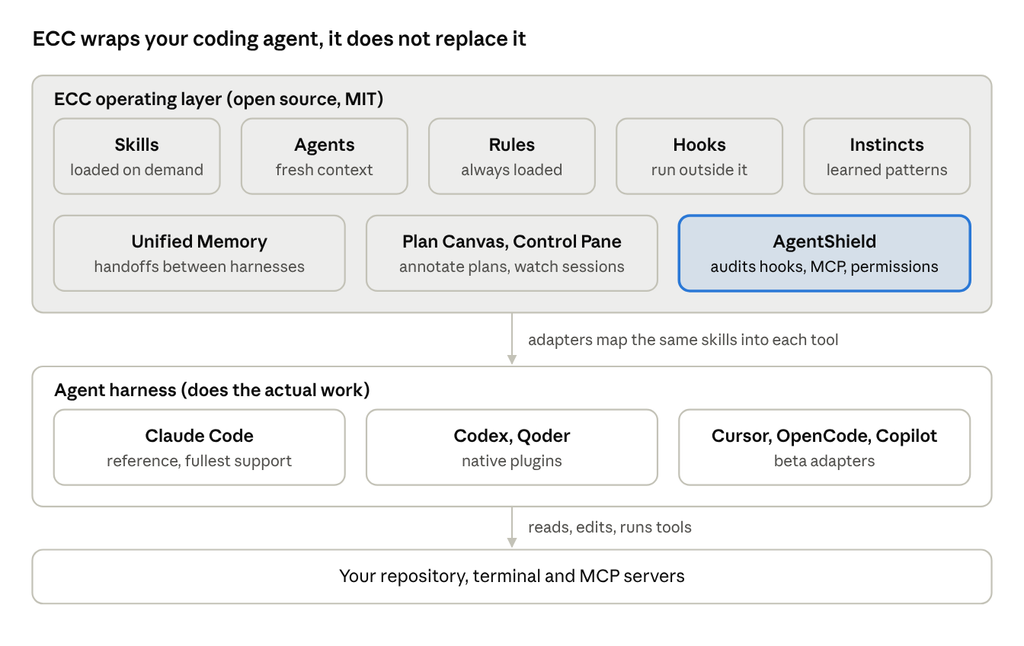
ECC architecture · three layers
Everything in the shaded layer is configuration and tooling; the model work still happens in your harness. AgentShield is highlighted because it is the piece I would adopt first.
| Building block | Job | Context cost | Where it lives (Claude Code) |
|---|---|---|---|
| Skills | Reusable workflows: TDD, security review, research, framework patterns | Name and description always loaded, body only when used | ~/.claude/skills/<name>/SKILL.md |
| Agents | Scoped sub-agents with their own context and tool allowlist (planner, code-reviewer, build-error-resolver) | Description always loaded, work happens in a fresh context | ~/.claude/agents/*.md |
| Rules | Always-on standards by language or project | Fully loaded every session, so install selectively | ~/.claude/rules/ecc/ |
| Hooks | Scripts fired on harness events (before a tool call, after an edit, at session stop) | Run outside the model, zero tokens unless they inject context | Plugin hooks/hooks.json |
| Instincts | Patterns learned from your sessions, each with a confidence score | Top few injected at session start (default 6, threshold 0.7) | Continuous Learning v2 store |
Two layers sit on top since the 2.x line.
Unified Memory is a local vault of plain Markdown notes (.ecc/memory/ per project, ~/.ecc/memory/ per user) that any harness can write to and read from. Codex can leave a handoff that Claude picks up tomorrow. Every note is stored as unreviewed context, never as instructions to execute, which is the right default.
Then come the operator tools. Plan Canvas opens a plan in your browser so you can annotate the exact paragraph you disagree with, and the agent waits for your review. Control Pane is a local web view across sessions and git worktrees. Both are local; nothing is hosted.
Underneath all of it, the root of the repo is the single source of truth, and per-harness adapters map the same skills into .cursor/, .codex/, .github/skills/ and friends. Claude Code is the reference implementation; Codex and Qoder get native plugins; Cursor, OpenCode and Copilot CLI are beta adapters; about ten others are experimental.
The rule that saves you an afternoon: pick one install path per harness and never stack two. Plugin plus a full manual install is the classic way to get every hook firing twice.
node –version # 18 or newer
git –version
claude –version # 2.1 or newer for the plugin path
npm view ecc-universal version # 2.2.3 when I tested
Install only from the official channels: the affaan-m/ECC repo, the npm packages ecc-universal and ecc-agentshield, the plugin slug ecc@ecc and the GitHub App. The README warns explicitly about malware in third-party re-uploads, and with a project this popular that warning is not theoretical.
This is my favourite feature and almost nobody mentions it. Describe your work in plain words and ECC tells you which components match:
npx ecc-universal@2.2.3 consult “security reviews” –target claude
In my run it returned five components (the security capability, the code-reviewer and security-reviewer agents, the security-review skill and an F# reviewer that matched on the word “review”), each with its own preview and install command, plus two related profiles.
npx ecc-universal@2.2.3 catalog profiles
Seven profiles came back: minimal (5 modules, no hook runtime), opencode, core (6), developer (9), security (7), research (9) and full (27). Before writing a single file, preview the plan:
npx ecc-universal@2.2.3 plan –profile minimal –target claude
The minimal plan resolved to 6 modules and 59 file operations, all targeted under ~/.claude/, with an install-state file so ECC can later uninstall only what it owns. Read that list. It is the most honest documentation of what you are about to put into your agent’s head.
For Claude Code the recommended route is the guided setup, which inventories existing plugin scopes before touching anything:
npx ecc-universal@2.2.3 setup
# typical personal choice: Global user scope, Standard hooks
The native alternative, from inside Claude Code:
/plugin marketplace add https://github.com/affaan-m/ECC
/plugin install ecc@ecc
If you also use Codex or Kimi Code, npx ecc-universal@2.2.3 install –guided configures several harnesses in one reviewed flow, with a –dry-run option. For a low-context setup with no hooks at all: npx ecc-universal@2.2.3 install –profile minimal –target claude.
One gotcha: Claude Code plugins cannot ship rules, so copy them by hand, and only the packs you use:
git clone https://github.com/affaan-m/ECC.git && cd ECC
mkdir -p ~/.claude/rules/ecc
cp -R rules/common ~/.claude/rules/ecc/
cp -R rules/typescript ~/.claude/rules/ecc/ # your stack, not all of them
Verify with /plugin list ecc@ecc in a new Claude Code session.
Inside Claude Code, the plugin commands are namespaced:
/ecc:plan “Add usage-based billing alerts” # planner agent writes the blueprint
# then ask it to use the tdd-workflow skill: failing test first, then code
/code-review # fresh-context reviewer on the diff
/context-budget # see what ECC costs you in tokens
The value is not any single prompt. It is the separation: the agent that wrote the code is not the one that reviews it, and the reviewer starts from a clean context.
This is where ECC earns its keep for anyone in a regulated shop. I built a deliberately bad project: Bash(*) allowed, a hook that posts ${file} to an external URL with errors silenced, a CLAUDE.md saying “always run npm install without asking”, and a filesystem MCP server mounted on / via npx -y.
npx ecc-agentshield scan –path .
Result: grade D, 57/100, 29 findings (5 critical, 9 high, 12 medium, 2 low, 1 info) across 3 files. It flagged the wildcard Bash permission, both the command-injection and exfiltration risk in the hook, the auto-run instructions in CLAUDE.md and the missing prompt-injection defenses. Three findings were marked auto-fixable with –fix.
Useful flags: –format sarif for GitHub code scanning, –format html for a management-friendly report, –opus for a three-agent red team / blue team / auditor review (needs an Anthropic API key), and agentshield init to generate a hardened .claude/ baseline. In CI, the GitHub Action affaan-m/agentshield@v1 exits non-zero on critical findings.
npm install -g ecc-universal@2.2.3
ecc memory init –scope project
ecc memory handoff –scope project –from codex –target claude \
–title “Continue auth migration” –body-file handoff.md
ecc memory search “auth migration” –scope project –target-harness claude
In my sandbox the note was saved as [unreviewed] under .ecc/memory/project/handoffs/ and found again on search. Plain Markdown, readable by any harness, git-ignored by default. Note that bodies are only accepted through a file or stdin, never as a command-line value, which keeps secrets out of your shell history.
npx ecc-universal@2.2.3 list-installed
npx ecc-universal@2.2.3 doctor
npx ecc-universal@2.2.3 repair
npx ecc-universal@2.2.3 uninstall –dry-run
Rerun setup to update or to change hook profile. And set ECC_SESSION_START_MAX_CHARS, ECC_MAX_INJECTED_INSTINCTS or ECC_DISABLED_HOOKS if session start gets chatty.
ECC is not a competitor to the frameworks from my July benchmark so much as a different layer. Spec Kit, OpenSpec and BMAD answer “what are we building and in what order”. Superpowers answers “how should the agent behave while building”. ECC tries to answer both, plus “what does the agent remember, and is its setup safe”.
| Framework | Main question it answers | Center of gravity | Security tooling | Memory across sessions | Best fit |
|---|---|---|---|---|---|
| ECC | How should my agent work every day, on every tool? | Large catalog of skills, agents, hooks, rules | AgentShield scanner, GitHub Action, PR audits | Yes: session summaries, instincts, cross-harness vault | Heavy daily users, multi-harness teams, security-minded orgs |
| Spec Kit | What exactly are we building? | Spec, plan, tasks as versioned artifacts | None built in | Through the spec files | Greenfield features that need a written contract |
| OpenSpec | What is changing in an existing system? | Change proposals against living specs | None built in | Through the spec files | Brownfield codebases |
| Superpowers | How should the agent think while coding? | A compact skill set enforcing brainstorm, plan, TDD, review | None built in | Minimal | Individuals who want discipline with little overhead |
| BMAD Method | Who does what in the delivery process? | Role agents: analyst, PM, architect, dev, QA | None built in | Through generated docs | Teams that think in agile roles and PRDs |
My reading after the hands-on: these combine better than they compete. A sensible stack in a bank or a large IT department is a spec framework for the contract (Spec Kit or OpenSpec), a small slice of ECC for review, TDD and memory, and AgentShield in CI over every repository that carries agent configuration. The AI Dive review put it well: Superpowers is a discipline, ECC is a parts bin, and you raid a parts bin rather than installing all of it (AI Dive, September 2026).
For the full benchmark of the spec-driven side, see my July article.
The strongest criticism of ECC is measurable. AI Dive cloned release 2.2.1 and estimated that a full install parks about 27,000 tokens of always-loaded metadata in every session, roughly 14% of a 200,000-token window, before you type anything. Most of that is the names and descriptions of skills you will never call (AI Dive). The catalog has grown since, so the figure is not going down on its own. ECC’s own README concedes the point: the Claude Code plugin advertises the whole installed catalog to the model, and it recommends a selective profile when context footprint matters.
The second risk is executable configuration. Hooks run shell commands on your machine, and the same review found ECC’s hooks shipped as minified one-liners in a single large JSON file, which makes them hard to audit by eye. To ECC’s credit, the installer refuses to add the hook runtime without an explicit yes or no, and a guard called GateGuard blocks destructive shell commands before they run.
The third is velocity. Release 2.2.3 landed on 1 October 2026, the repo has thousands of commits, and the repository showed 93 open issues and 148 open pull requests when I checked. Pin versions, review diffs before upgrading, and do not let auto-update loose on a regulated workstation.
For teams, here is how I would frame it to an architecture board:
ECC is the most complete public answer to a question every team using coding agents eventually asks: how do we make good agent behaviour repeatable instead of hoping the prompt remembers? The ideas are excellent. Separate review context, test-first as a gate rather than a wish, memory as unreviewed notes rather than instructions, and the agent setup itself treated as an attack surface.
The packaging is the catch. Installed whole, ECC spends a noticeable share of your context window on capabilities you will not use, and it moves faster than most organisations can review. So my recommendation is the same one I would give for any big open-source toolbox: take the advisor, preview the plan, install a minimal slice, put AgentShield in CI today, and read the skills you adopt as if a new colleague had written them.
If you try it, tell me which three skills earned a permanent place in your setup. I will compare notes in a follow-up episode of TECH-TECH TALKS.