

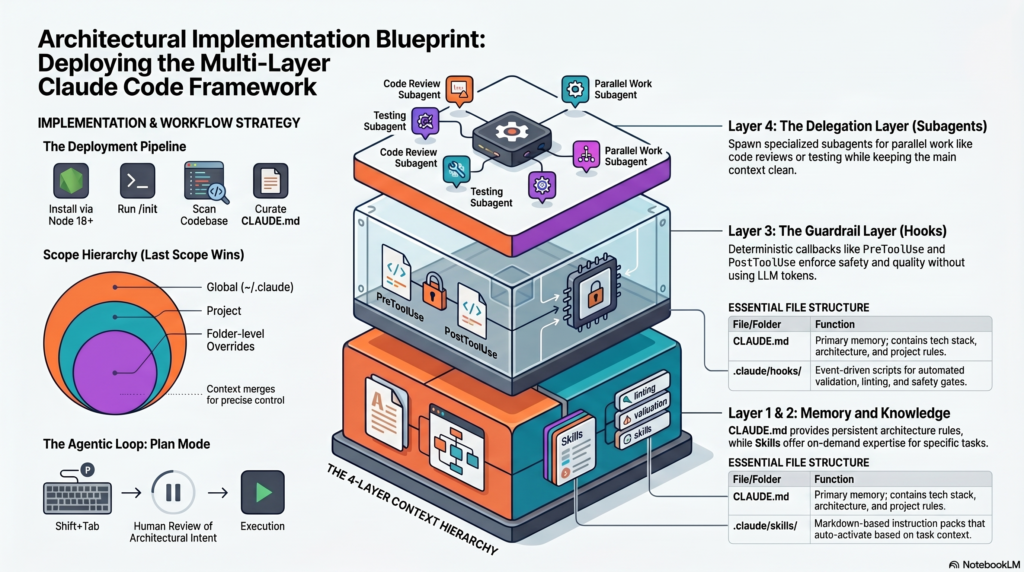
Deprecate the “chatbot” mental model in favor of the stateful runtime primitive. In high-performance engineering environments, viewing Claude Code as a conversational assistant is a Level 1 bottleneck. To achieve Level 4 architectural maturity, you must treat Claude Code as a comprehensive agent development kit (ADK) capable of executing tasks while you sleep—refactoring 10,000 files in minutes and operating with full file-system autonomy.
The core differentiator is the transition from stateless prompting to an integrated engineering workflow. By leveraging full system access and the Model Context Protocol (MCP), Claude Code moves beyond “suggesting” code to actually implementing, testing, and committing it. This creates a “deterministic autonomy” where the agent functions as a senior-level teammate rather than a basic text generator.
| Dimension | Standard AI Chat (Level 1) | Production-Grade Claude Code (Level 4) |
| Memory | Stateless/Ephemeral sessions. | Persistent; via layered CLAUDE.md and CLAUDE.local.md. |
| Tool Usage | Restricted sandbox/UI copy-paste. | Full local file-system access & shell execution. |
| Guardrails | Probabilistic prompt instructions. | Deterministic via lifecycle Hooks (JSON-RPC/stdio). |
| Context Mgmt | Manual attachment of files. | Modular via Skills, MCP servers, and /compact. |
| Velocity | Suggests individual snippets. | Executes full PR loops (Plan → Code → Test → Commit). |
This senior-level performance is built upon the foundational layer of persistent memory, ensuring every session begins with the agent fully synchronized with the project’s technical DNA.
——————————————————————————–
The foundation of a high-performance setup is CLAUDE.md. It is not a README for humans; it is the agent’s constitution. Without structured memory, agents succumb to hallucinations and context drift. Every project must begin with the /init command, which allows Claude to scan the repository and scaffold a baseline memory file, replacing hours of manual onboarding documentation.
Claude Code utilizes a tiered inheritance model. The system merges configurations following the “Last Scope Wins” rule:
~/.claude/CLAUDE.md): Universal defaults, personal coding styles, and global preferences../CLAUDE.md): The primary source of truth for the tech stack, architecture, and team conventions../CLAUDE.local.md): User-specific overrides for local environments, specialized debug flags, or individual workflows (Git-ignored)../src/components/CLAUDE.md): Module-level overrides for specific APIs or utilities.To eliminate vague instructions, structure your CLAUDE.md files using this technical mapping:
| Component | Focus | Technical Requirements |
| WHAT | Context | Project name, Tech Stack (e.g., Next.js 14, Supabase), Directory Map, and Environment Variables. |
| WHY | Design Principles | Architecture decisions (e.g., App Router), Naming Conventions, Anti-patterns to avoid. |
| HOW | Workflow | Precise Build (npm run build), Test (npm test -- --watch), and Lint commands; Git commit formats. |
CLAUDE.md under 500 lines to prevent context bloat. Scoped Folder files should remain under 200 lines.package.json or tsconfig.json for details rather than re-pasting content./init for Onboarding: Always scaffold new projects via the CLI to capture the baseline repository structure.——————————————————————————–
Skills provide “on-demand” expertise, keeping the main context window lean by loading domain-specific knowledge only when necessary. Unlike the “always-on” memory layer, Skills are modular context chunks that Claude activates based on the task at hand.
A Skill is more than just a prompt; it is a directory-based package located at .claude/skills/<name>/. It consists of:
By executing these tasks in isolated subagent sessions, modularity prevents “context pollution” in the main session, ensuring specialized assets do not exhaust the primary token window.
——————————————————————————–
Hooks are the “Git hooks for agents.” This layer is strictly deterministic—it is not AI-based. Hooks use JSON-RPC over stdio or shell execution to create a safety gate between the AI’s intent and the system’s execution, ensuring 100% enforcement of quality standards.
| Event | Production Use Case |
| PreToolUse | Block dangerous commands (e.g., rm -rf) or check for hardcoded secrets. |
| PostToolUse | Auto-lint or format every file immediately after the agent writes to it. |
| SessionStart | Load environment-specific configurations or specialized project context. |
| SessionStop | Send change summaries to Slack or update a Jira/Linear ticket status. |
| SubagentStop | Validate the output of a specialized subagent before merging to the main state. |
| PreCommit | Execute a dedicated secret detection gate to prevent credential leakage. |
Hooks rely on Exit Codes:
This allows teams to run Claude in “headless” mode (using the -p flag) for CI/CD or background automation with total confidence in safety and quality enforcement.
——————————————————————————–
For complex, multi-step tasks, the framework utilizes the Orchestrator Pattern. This solves context window exhaustion by spawning specialized sub-agents. The system follows a “Fan-out / Fan-in” mechanism: decompose the task, spawn specialists, collect results, and unify the output.
As a Claude Ecosystem Specialist, you must match the model version to the logic requirement:
Critical Constraint: To maintain system stability and prevent token recursion, Subagents cannot spawn further subagents.
——————————————————————————–
The Model Context Protocol (MCP) is the “USB-C for LLMs.” It transforms Claude from a local terminal tool into a central orchestration layer for the entire enterprise.
MCP servers allow Claude to interact with:
MCP integrations are defined in mcp.json. Because this file is stored in the repository, agentic capabilities become shareable infrastructure. When a new engineer joins, they pull the latest mcp.json via Git and immediately possess the same tool-reach as the rest of the team.
——————————————————————————–
Operational efficiency is an architectural requirement. Claude counts tokens, not messages; every new message re-sends the entire conversation history.
The most critical habit for token conservation is “Edit, Don’t Stack.” If Claude makes an error, edit your previous message to correct it. This resets the context to that point and prevents the exponential cost of reloading a failing conversation thread.
/compact to summarize and compress the context window.By integrating these four layers—Memory, Skills, Hooks, and Agents—and maintaining operational rigor, Claude Code evolves into a permanent, senior-level teammate integrated into the very fabric of the codebase.
——————————————————————————–
Authored by Sami BELHADJ from tech-tech.life | Based on the Claude Code Engineering Framework.
