

If you’ve spent any real time building with LLMs, you’ve hit the wall. The prompt that worked perfectly on Tuesday returns garbage on Thursday. The output that looked great for your demo edge-cases its way into production bugs. You tweak one sentence in your system prompt and three unrelated behaviors break.
Sound familiar? It should. Software engineers solved a version of this problem decades ago. They called it Test Driven Development. The same discipline—define what “correct” looks like before you write the code—applies directly to prompt engineering. I call it Test Driven Prompting (TDP), and it’s the single most impactful practice I’ve adopted for building reliable LLM-powered systems.
Most prompt engineering looks like this: you write a prompt, eyeball the output, adjust, eyeball again. It’s vibes-based development. And vibes don’t scale.
The moment you have more than one person touching a prompt, or more than a handful of use cases, or a model update landing next month, the vibes-based approach collapses. You can’t review a prompt change in a pull request if you don’t know what the prompt was supposed to do in the first place. You can’t confidently swap from one model to another if you have no definition of “working correctly.” You can’t delegate prompt work to a teammate if the acceptance criteria live entirely in your head.
TDP fixes this by borrowing the core insight of TDD: define expected behavior first, then write the implementation to satisfy it.
In TDD, the cycle is red-green-refactor. You write a failing test that specifies desired behavior. You write the minimum code to make it pass. Then you clean up. The test is the source of truth—not the code.
TDP follows the same structure:
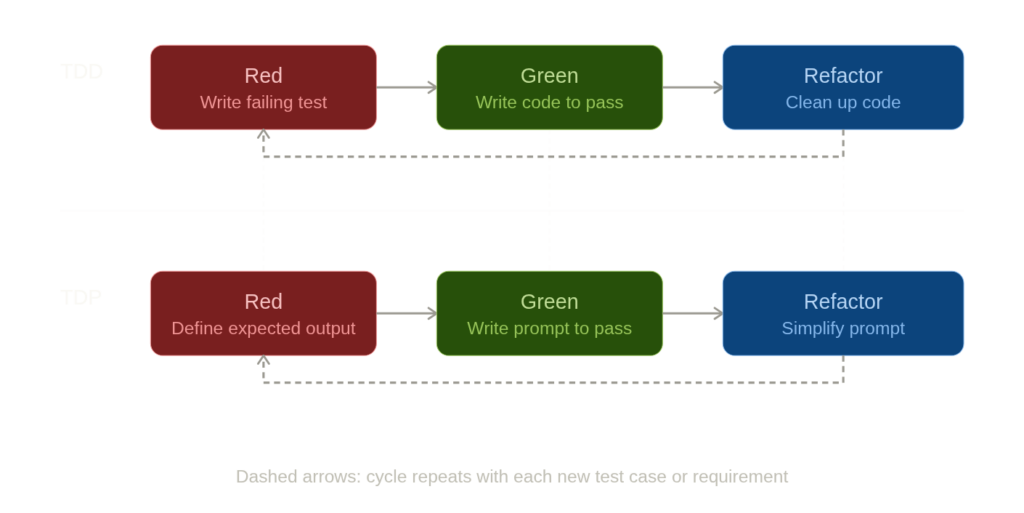
The “test” in TDP is a pair: an input (the user message or context you’ll feed the model) and an expected output specification (what the response must contain, must not contain, or must structurally look like). The “implementation” is the prompt itself—your system message, few-shot examples, output format instructions, and so on.
Let’s make this concrete. Say you’re building a prompt that generates Python utility functions from natural language descriptions—the kind of thing you’d wire into a coding assistant or an internal developer tool.
Before writing a single word of the system prompt, you define your test suite:
tests:
  - input: "Write a Python function that reverses a string"
    assertions:
      - contains: "def "
      - contains: "return"
      - code_executes: true
      - call_result:
          args: ["hello"]
          expected: "olleh"

  - input: "Write a function that checks if a number is prime"
    assertions:
      - contains: "def "
      - code_executes: true
      - call_result_batch:
          - args: [7]
            expected: true
          - args: [1]
            expected: false
          - args: [4]
            expected: false

  - input: "Write a function that flattens a nested list"
    assertions:
      - code_executes: true
      - call_result:
          args: [[1, [2, [3, 4]], 5]]
          expected: [1, 2, 3, 4, 5]
      - must_not_contain: ["pip install", "import numpy"]
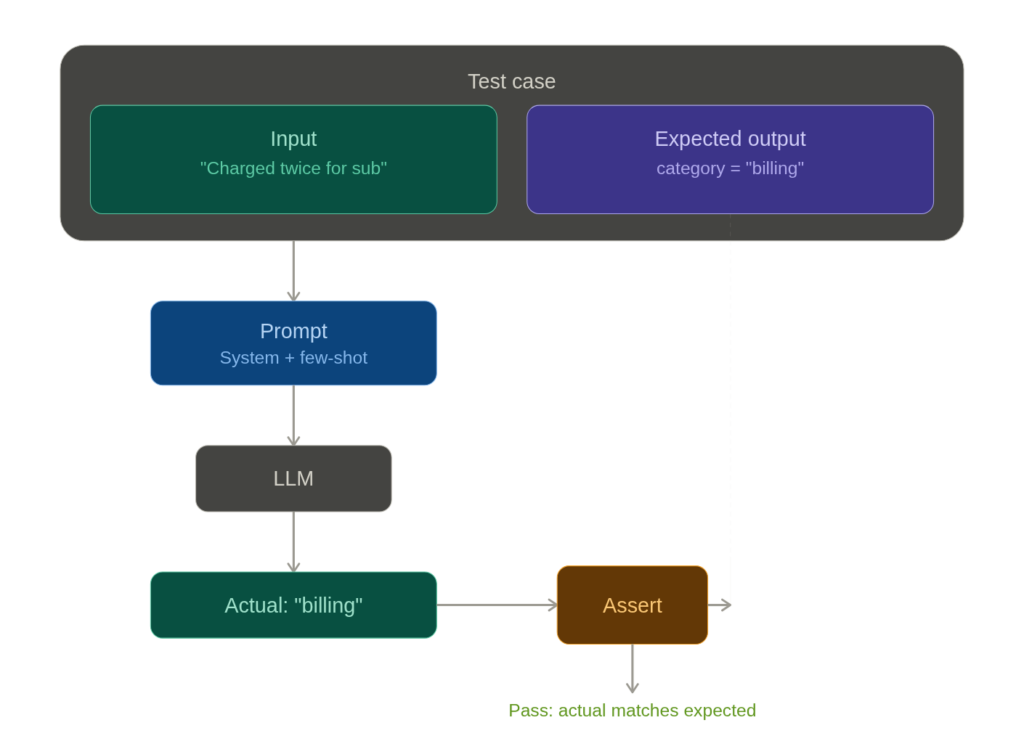
Each test case has a clear input and clear assertions. That last one is worth noting—it tests that the model doesn’t reach for heavy external dependencies when the standard library suffices. That’s a design decision, and it now lives in the test suite rather than in someone’s memory.
Failing looks like: the model returns a prime checker that incorrectly reports 1 as prime. Or it wraps the code in conversational prose instead of a clean code block. Or the flattening function only handles one level of nesting.
Passing looks like: every function executes without errors, returns the correct output for all specified inputs, and respects the structural constraints you defined.
You run all cases against your prompt. If the string reversal and flattening pass but the prime checker mishandles edge cases, you’re in red. You revise the prompt—maybe you add an instruction about handling edge cases, maybe you include a few-shot example that demonstrates careful boundary checking—and run again. When all three pass, you’re in green. Then you refactor: can you simplify the system prompt without breaking anything? Remove a redundant instruction? The tests will tell you.
Code generation is nice because you can actually execute the output and check it programmatically. But even within this example, you probably care about more than whether the function returns the right answer.
You might want to assert that the function includes a docstring, that variable names are descriptive, that the solution uses idiomatic Python rather than a C-style loop translated into Python syntax. Some of these checks are automatable (regex for a docstring, AST parsing for code style). Others—like “is this idiomatic?”—are better handled by an LLM-as-judge pattern: a second model call that scores the output against your criteria.
  - input: "Write a function that counts word frequencies in a string"
    assertions:
      - code_executes: true
      - contains: '"""'  # has a docstring
      - llm_judge:
          criteria: "Uses collections.Counter or dictionary comprehension.
                     Does not manually iterate with a for-loop and if/else."
          pass_threshold: 0.8
The grading prompt itself can be developed using TDP. It’s turtles all the way down—but practically, one level of meta-testing is usually enough.
Here’s where TDP earns its keep. Models change. Anthropic ships a new version of Claude. OpenAI updates GPT-4. You update your prompt because a new use case came in. In any of these situations, your existing behavior can silently break.
With TDP, you re-run your entire test suite after every change. This is exactly how regression testing works in software. The code generation prompt that handled edge cases in the prime checker last week? Run the test. The flattening function that avoided unnecessary imports? Run the test. If something breaks, you know immediately, you know exactly which case broke, and you know what “working” looked like before.
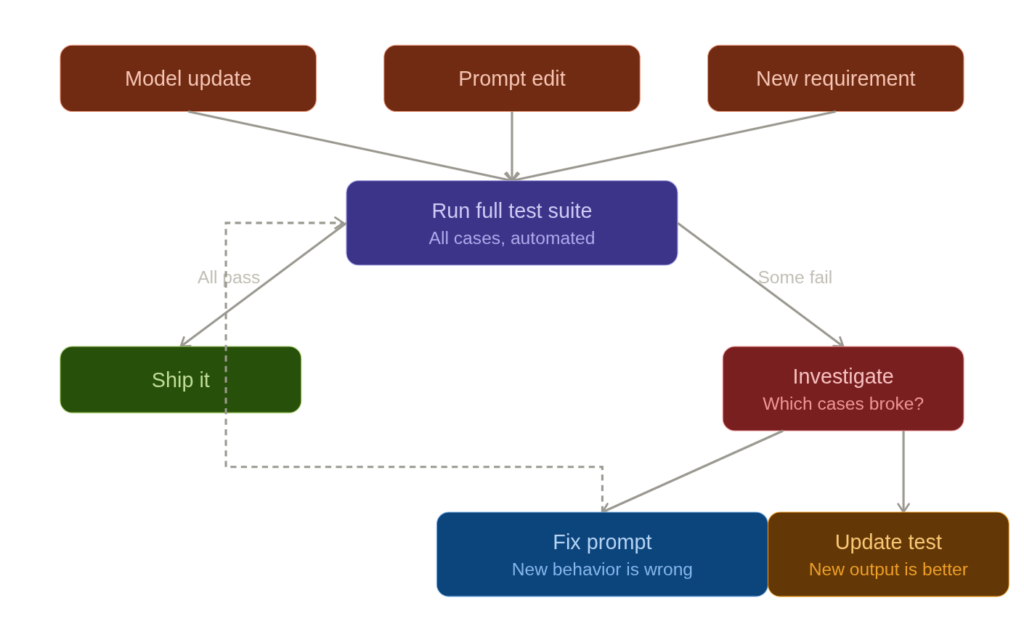
This is especially critical during model migrations. If you’re moving from Claude Sonnet to Claude Opus, or from one model version to another, your test suite becomes your migration checklist. Run all tests against the new model. Green across the board? Ship it. Three failures? You now know exactly where the new model behaves differently, and you can decide whether to adjust the prompt, adjust the tests (if the new behavior is actually better), or stay on the old model for now.
The principles of TDP are tool-agnostic, but the ecosystem for prompt evaluation is maturing fast enough that you don’t have to build everything from scratch.
promptfoo is purpose-built for this: you define test cases in YAML, specify assertions (including LLM-graded ones), and run them against multiple models and prompt variants in a matrix. It’s the closest thing to a pytest for prompts. LangSmith gives you tracing and evaluation tied into the LangChain ecosystem, which is useful if your prompts are part of larger chains or agent workflows. For teams already deep in Python testing infrastructure, building a pytest-based harness that calls the model API and asserts on the response works surprisingly well—you lose the specialized UI but gain full integration with your existing CI/CD pipeline.
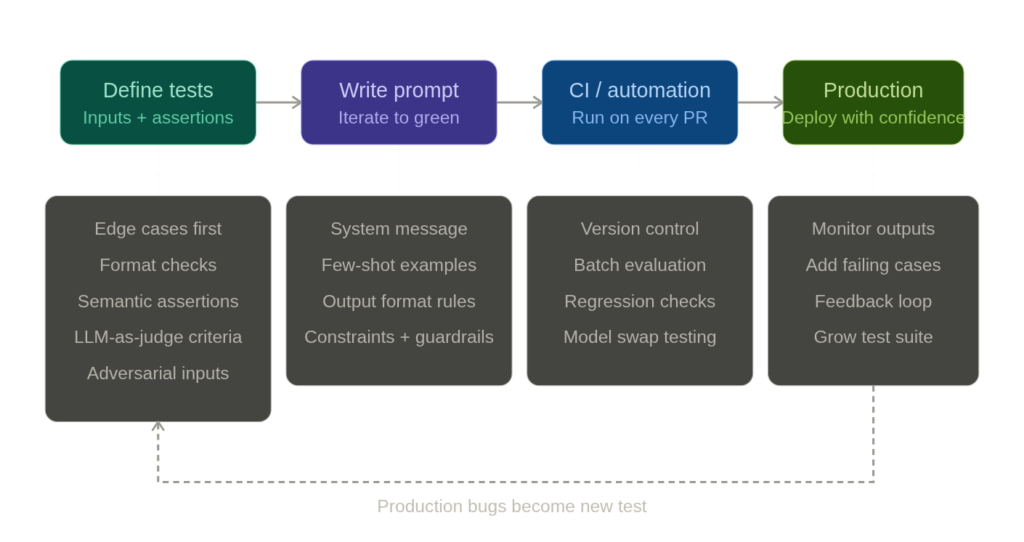
Dedicated evals frameworks like OpenAI’s evals library and Anthropic’s model evaluation tools focus on systematic evaluation at scale. The specific tool matters less than the practice. Even a hand-rolled script that loops through test cases in a JSON file and prints pass/fail is a massive improvement over staring at outputs in a chat window.
Version control your tests alongside your prompts. If the prompt lives in a config file or a code repository, the test suite should live right next to it. A pull request that changes a prompt without updating or running the tests should raise the same red flag as a code change that skips unit tests.
Start with the edges, not the center. When building a test suite from scratch, don’t begin with the obvious, happy-path cases. Start with the ambiguous inputs, the adversarial inputs, the format-breaking inputs. The obvious cases will probably keep working across prompt revisions; it’s the subtle ones that break first.
Treat test failures as information, not blockers. Sometimes a test fails because the new output is genuinely better than what you originally specified. That’s fine—update the test. The point isn’t that the original expected output is sacred. The point is that you’re making a conscious, documented decision about what “correct” means, rather than letting it drift.
The hardest part of TDP isn’t the tooling or the test cases. It’s the discipline of writing expected behavior before writing the prompt. It feels slow. You want to just start prompting and iterate by feel. And for quick experiments, that’s fine—TDP isn’t for your one-off chat session. It’s for prompts that run in production, prompts that other people depend on, prompts that need to work reliably across thousands of inputs.
The parallel to TDD is exact here. TDD also feels slow when you’re used to writing code first. But every experienced practitioner will tell you the same thing: the tests aren’t slowing you down. They’re preventing the rework that would have slowed you down far more.
If you’re building anything with LLMs beyond a weekend prototype, you need a definition of “correct” that exists outside your intuition. TDP gives you that. Write the test. Then write the prompt.
